Plan hebrew website localization as language, RTL interface, cultural tone, QA, and review—so Hebrew reads native before launch, not after cleanup.
Replace raw MT cleanup with a Hebrew localization workflow
Hebrew website localization is the process of adapting the language, appearance, and functionality of a website for Israel (Source: Globalization Partners). That definition matters because it moves the job away from "translate the text, then fix what looks broken" and toward planned work: language, RTL interface, cultural tone, QA, and a review chain before anything goes live.
The cleanup model looks cheap up front. You run machine translation across the site, then patch the awkward Hebrew after users complain. The problem is that Hebrew breaks in ways English editors can't see: masculine defaults where a feminine form belongs, formal phrasing that reads as evasive, mirrored layouts that never got mirrored. By the time you're fixing it live, you've already paid twice.
A workflow-first approach treats each of these as a stage, not a surprise. Globalization Partners lists a comprehensive process that includes translation, editing and proofreading, cultural correctness assessment, usability testing, online QA, and glossary and terminology development. None of that is optional polish. It decides whether a site reads native or reads translated.
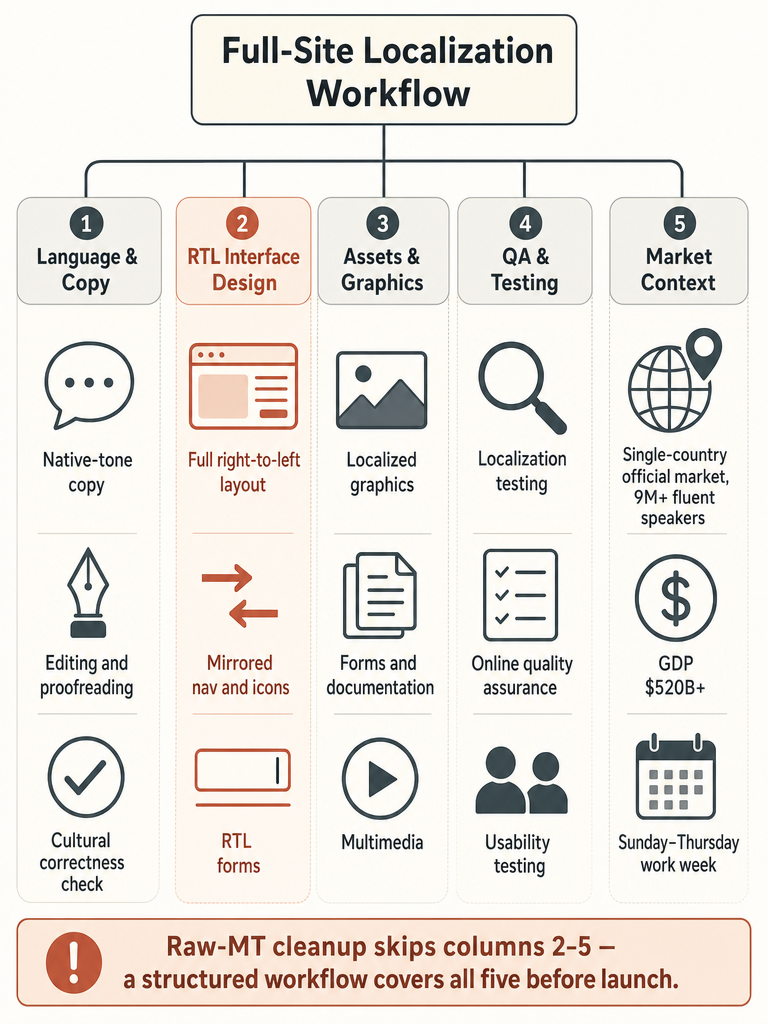
Plan Hebrew localization as five tracks (language, RTL interface, cultural tone, QA, and editorial review) and raw-MT cleanup stops being a phase you dread.
The market rewards getting this right. Nimdzi cites that 7 out of 10 users will always select their native language over English. For a Hebrew audience, that preference is the whole business case.
Do we need full Hebrew localization or just translation for website pages, UX, and supporting assets?
Full localization covers everything a Hebrew user touches, while translation covers only the words on the page. Globalization Partners defines Hebrew website localization as adapting language, appearance, and functionality for Israel, which means page copy is one input among many. If you only translate copy, the site works in words and breaks in experience.
Here's what belongs in scope beyond the visible page text:
Graphics and navigation buttons with baked-in English text
Forms and their labels, error messages, and validation
Documentation available as PDFs
Multimedia like presentations and embedded video
Web applications such as online calculators or surveys
Cultural correctness across all of it
Client review and approval as a formal gate
Globalization Partners is explicit that if you localize your site, you may also find yourself localizing printed documentation, multimedia products, and web applications, and that all components must be correctly localized to offer a complete Hebrew web experience.
So the honest answer for most teams is: more than translation, less than a rebuild. A static HTML page needs translation plus RTL. A dynamic, database-driven web application needs the full track, forms, functionality, QA, and approval included.
Does my website need a full RTL redesign?
Hebrew needs full right-to-left interface work, not a simple text-direction switch. MotaWord states that navigation, forms, and icons all need mirroring, the same consideration Arabic requires. Flipping text alignment without mirroring the layout produces a site that looks Hebrew but behaves like English underneath.
Tomedes breaks the RTL work into concrete adjustments. Navigation elements typically placed on the left in English interfaces move to the right. That applies to menus, buttons, and scroll bars. Progress indicators and "back" buttons get reversed to match the RTL flow. Icons may need mirroring, and text alignment switches from left-aligned to right-aligned. Tomedes also flags text expansion: Hebrew translations can run longer than the English original, which stresses button and label widths.
The scale of the interface work is real. When the USC Shoah Foundation localized its Visual History Archive into Hebrew, Anita Pace told Academic Language Experts they had to reconceptualize the entire layout from right to left, because every button and every prompt required accurate localization for an easy user interface (Source: Academic Language Experts).
RTL is a layout QA problem more than a CSS setting: mirror the navigation, reverse the controls, then test the whole interface in Hebrew before launch.
Mixed content is where teams get caught: Hebrew copy with embedded English brand names, numbers, and form fields. Each of those needs its own direction handling inside an RTL page.
Is Hebrew the same as Arabic since both are right-to-left?
Hebrew and Arabic share text direction and nothing else that matters for localization. MotaWord is direct about this: both are right-to-left, but they use entirely different scripts and belong to different language traditions. Never substitute one for the other, and never reuse Arabic linguists or fonts assuming they'll transfer.
This is one of the two mistakes MotaWord names as the usual source of Hebrew localization failure, the other being missing Israel's business calendar. Teams that have already localized for Arabic sometimes assume the Hebrew job is a font swap on the same RTL infrastructure. The infrastructure can be shared. The linguists, fonts, and cultural assumptions cannot.
Practically, that means Hebrew work needs native Hebrew linguists, Hebrew-specific fonts, and Israeli cultural review. An Arabic reviewer signing off on Hebrew copy is not quality control.
Raw MT cleanup vs AI-assisted Hebrew review: which workflow fits large content volumes?
An AI-assisted workflow with human review handles large Hebrew volumes better than raw MT followed by cleanup. The clearest evidence is the USC Shoah Foundation. Its Visual History Archive holds more than 56,000 testimonies, with archive metadata of almost 70,000 indexing terms and definitions, all originally in English (Source: Academic Language Experts).
To localize that into Hebrew, the metadata alone required translation of over 5 million words, and the organization had about eight months to do it (Source: Academic Language Experts). That combination, high volume and a fixed deadline, is exactly where a pure human process stalls and a pure machine process ships errors. The chosen model paired AI-assisted translation with human oversight and editorial review, plus the full RTL layout rework.
The difference between the two models is where correction happens:
Factor
Raw MT + cleanup
AI-assisted + human review
Where errors get caught
After publish, by users
Before publish, by reviewers
Gender/tone accuracy
Left to chance
Reviewed as a stage
Fit for high volume
Fast, but debt piles up
Scales with oversight
Editorial control
Minimal
Built into the workflow
The Shoah Foundation localized over 5 million words in roughly eight months by pairing AI-assisted translation with human review, not by cleaning up raw machine output after the fact.
Cleanup feels faster until you count the second pass. A review stage builds the quality in the first time through.
What review and QA steps are essential before publishing a Hebrew-localized website?
Every Hebrew site launch should clear a defined QA chain before it goes live, not a spot-check. Globalization Partners lists a minimum comprehensive process, and it doubles cleanly as a pre-launch checklist. Run these in order:
Hebrew translation of all page copy, labels, and assets.
Editing by a native Hebrew linguist.
Proofreading for spelling, spacing, and RTL punctuation.
Cultural correctness assessment for tone and Israeli context.
Hebrew usability testing with real Hebrew users navigating the RTL interface.
Hebrew localization testing for layout, expansion, and mixed content.
Hebrew online quality assurance on the live-staged pages.
Localization of graphics so no English text survives in images.
Glossary and terminology development so terms stay consistent across the site.
Client review and approval as the final gate.
Glossary and terminology development is the step most teams skip and most regret. Without a locked glossary, the same product term gets translated three ways across a site, which reads sloppy to native users and breaks search.
Skip the check and the cost moves downstream. Every stage you cut here becomes a cleanup ticket after launch.
How should Israeli tone, timing, and business context change the copy?
Israeli-facing copy should read direct, not hedged. MotaWord describes Israeli communication culture, sometimes called "dugri," as valuing bluntness and efficiency, and warns that hedged or overly formal marketing copy can read as evasive rather than polite. English marketing instincts, softening claims and layering qualifiers, run backwards here. Say the thing plainly.
Timing changes too. MotaWord notes the Israeli work week runs Sunday to Thursday, with Friday evening through Saturday as Shabbat. Delivery estimates, support hours, and promotional timing all need to reflect that calendar, not a Western Monday-to-Friday default. A "we respond within one business day" promise means something different when the week ends Thursday.
On the script itself, standard commercial and informational Hebrew usually omits vowel points, or niqqud (Source: MotaWord). MotaWord notes niqqud mainly appears in children's books, poetry, and liturgical text, not commercial web content. Adding vowel marks to marketing copy signals that whoever wrote it doesn't read Hebrew every day.
Direct phrasing, a Sunday-to-Thursday calendar, and no niqqud are three tone decisions that separate Hebrew written for Israelis from Hebrew translated from English.
These are copy decisions, not translation decisions. A literal translator can nail the words and still miss all three.
What technical setup is required for Hebrew SEO targeting Israel?
Hebrew SEO for Israel starts with the he-IL hreflang tag. MotaWord states that he-IL is the standard hreflang tag for Hebrew content targeting Israel. That tag tells search engines the page is Hebrew for the Israeli market, which is the base signal for surfacing the right language version to the right user.
Beyond hreflang, MotaWord notes that standard SEO tooling applies, with RTL rendering carrying the same technical weight it does for Arabic. So the technical checklist is short but non-negotiable:
he-IL hreflang on every Hebrew page, paired correctly with the source-language version.
Correct RTL rendering so crawlers and users see a coherent layout, not scrambled text order.
Mobile usability on RTL layouts, which matters given Nimdzi's finding that over 50% of customer decisions happen on mobile.
The conversion case sits underneath the technical one. Nimdzi cites that 7 out of 10 users will always select their native language over English, and Phrase reports that 65% of consumers prefer information in their own language, even if it's poor quality (Source: Phrase). Native-language access isn't just a search signal. It's what keeps an Israeli visitor on the page long enough to convert.
Which localization kit should your team prepare before vendor or workflow selection?
Assemble the Localization Kit before you talk to any vendor or pick a workflow. Globalization Partners defines this kit as the information that lets a localization team analyze your website and determine its Hebrew requirements. Having it ready shortens scoping and produces accurate quotes instead of guesses.
The kit includes:
Item
Why it's needed
Current site URL
Lets the team see the live site and its scope
All files in original folder/file structure
Preserves how the site is actually built
Summary of site architecture
Shows how pages and components connect
Summary of technologies and development tools
Flags RTL and CMS constraints early
Source files for documentation (Word, FrameMaker, Quark)
So PDFs and docs get localized, not just page copy
Source files for multimedia (Flash, Director, Authorware)
So embedded media isn't left in English
All original graphics (artwork, backgrounds, navigation buttons)
So text-in-image gets localized cleanly
The graphics and source files are the parts teams forget. Without the original artwork files, English text baked into buttons and banners survives the launch, and that's the exact half-localized look that undermines a Hebrew site. Gather these once, and every later stage, from scoping to QA, runs on real inputs instead of reverse-engineered ones.
What is the best tool for translating a website into Hebrew?
No single tool wins for every Hebrew site; the right pick tracks your content volume, editorial needs, and whether native-sounding Hebrew matters more than raw speed. Public Hebrew-specific benchmarks across the major website-translation tools are thin, so treat vendor Hebrew claims as marketing until you test them on your own copy. Judge any option against this checklist:
Native Hebrew output, not literal word-swaps that read robotic.
Gender handling, since Hebrew verbs, adjectives, and pronouns change with gender.
Full RTL support for layout, not just text direction.
Editorial review, so a human can catch fluent-but-wrong Hebrew.
Glossary and terminology control for consistency across pages.
CMS or workflow fit with how your team already publishes.
Tools cluster into rough types. No-code website translators like Weglot handle setup fast and suit smaller marketing sites. Localization platforms like Phrase and vendors like MotaWord and Academic Language Experts add editorial workflow for larger or higher-stakes content. RTL Master is a Shopify-specific app that applies RTL layout and store translation, rated 4.4 from 53 reviews on the Shopify App Store, starting at $19.95/month (Source: Shopify App Store).
How much does it cost to translate a website into Hebrew?
Scope sets the price for Hebrew website translation, not a single flat rate, and public pricing is fragmented and vendor-led. What you pay tracks word count, number of pages, RTL interface work, and how much editorial review you want, so a small marketing site and a database-driven web app land at very different numbers.
The one concrete published anchor comes from Weglot. Its Free plan costs $0/month and includes 2,000 translated words and 1 translated language, and Weglot says all plans are free for the first 14 days with no credit card required to start (Source: Weglot). That free tier is useful for a tiny site or a trial, and it makes the scaling problem obvious: 2,000 words covers a landing page, not a full site with documentation and forms.
For turnaround on managed work, MotaWord quotes a typical 12 to 24 hour window for Hebrew website translation. Speed and cost trade against review depth, and that trade is the real budget decision.
Approach
Best for
Cost signal
No-code tool free tier
Landing pages, trials
$0, 2,000-word cap (Weglot)
No-code paid plans
Small marketing sites
Scales by word count and languages
Managed editorial workflow
High-volume or high-stakes content
Quote-based, scope-driven
The honest takeaway: get scope-based quotes on your actual word count and asset list, not a headline price.
How publishers can connect Hebrew website localization with article review workflows
For publishers, site localization and article translation are one pipeline, not two projects. The same Hebrew-specific problems, gender, tone, terminology, and fluent-but-wrong output, show up whether you're localizing a homepage or translating a 2,000-word feature. Solving them once, in a shared workflow, is what keeps a Hebrew publication consistent.
The connective tissue is the editorial chain. A publisher-grade workflow runs cleanup, draft, native Hebrew review, terminology control, fact checks, CMS handoff, and final approval before anything publishes. That's the same review-and-QA logic Globalization Partners defines for whole-site localization, applied at article scale: nothing goes live on machine output alone.
Terminology control is where the two connect most directly. A locked glossary built for the site, product names, section labels, recurring terms, feeds straight into article translation so a term never gets rendered three different ways across the publication. CMS article translation and site localization share that glossary, share the review gate, and share the approval step.
Publishers get the cleanest Hebrew when article translation and site localization run on one editorial chain with a shared glossary and a single approval gate.
Where baba Hebrew Translator fits in a Hebrew-first localization workflow
baba Hebrew Translator fits the drafting and review stages, where robotic Hebrew usually gets introduced and where native-sounding output saves the most cleanup time. It's built Hebrew-first for English↔Hebrew, which is the exact pair most website localization projects run on, and it's aimed at the gender, slang, and cultural-tone problems that generic translation leaves for editors to fix.
The Hebrew-specific work is where it earns a place in the workflow. Hebrew verbs, adjectives, and pronouns shift with gender, and generic tools default to masculine, which is precisely the error that turns into a cleanup ticket after launch. Producing gender-aware, natural sentence-level Hebrew at the draft stage means editors review real copy instead of rewriting literal output.
It doesn't replace the QA chain. The editing, cultural correctness assessment, glossary work, and client approval that Globalization Partners lists still run. baba fits before final approval, cutting the volume of robotic copy that reaches your reviewers so their time goes to judgment calls, not word-by-word repair.
What is the best tool for translating a website into Hebrew?
No single tool wins for every Hebrew site — the right pick depends on content volume, RTL needs, and how much native-sounding output matters. No-code tools like Weglot handle small marketing sites fast, with a free tier covering 2,000 words. Managed platforms like Phrase or vendor workflows add editorial review for high-stakes content. For any tool, test gender-correct output on a real paragraph before committing — 'supports Hebrew' often means language-code acceptance, not accurate gendered grammar.
Best English to Hebrew translator for natural sentences
The biggest gap in Hebrew translation isn't vocabulary — it's gender. Hebrew verbs, adjectives, and pronouns all shift with the speaker's and listener's gender, and most generic tools default to masculine every time. A purpose-built Hebrew translator that resolves gender context before translating produces output editors can actually use. baba Hebrew Translator is built specifically for this English↔Hebrew pair, handling gendered grammar, slang, and Israeli tone at the sentence level rather than word by word.
Best Hebrew translator for gendered grammar
Gender accuracy is the hardest Hebrew problem to solve at scale. Hebrew verbs, adjectives, and pronouns change based on speaker gender, listener gender, plurality, and formality — and tools that skip that context default to masculine, which creates cleanup tickets after launch. baba Hebrew Translator resolves gender context before translating, asking who is speaking and who is listening and conjugating for that context, rather than defaulting to masculine forms the way tools that skip gender context do.
How much does it cost to translate a website into Hebrew?
Cost tracks word count, page volume, RTL interface work, and review depth — there's no flat rate. Weglot's Free plan starts at $0/month and covers 2,000 translated words in 1 language, with all paid plans free for the first 14 days and no credit card required to start. Managed editorial workflows with native Hebrew review are quote-based. For context, the USC Shoah Foundation's Hebrew localization project covered over 5 million words in roughly eight months — that scale requires a scope-based quote, not a headline price.
Does my website need a full RTL redesign for Hebrew?
Yes — flipping text direction without mirroring the layout produces a site that looks Hebrew but behaves like English underneath. Navigation elements, menus, buttons, scroll bars, progress indicators, and 'back' buttons all need to move or reverse. Icons may need mirroring, and Hebrew text can run longer than the English original, stressing button widths. The USC Shoah Foundation had to reconceptualize its entire Visual History Archive layout right to left, because every button and prompt required accurate localization for a usable Hebrew interface.
What QA steps are essential before publishing a Hebrew-localized website?
Run these in order before anything goes live: Hebrew translation of all copy and assets, native-linguist editing, proofreading for RTL punctuation and spacing, cultural correctness assessment for Israeli tone, Hebrew usability testing on both desktop and mobile RTL layouts, localization testing for text expansion and mixed content, online QA on staged pages, graphics localization so no English text survives in images, and a locked glossary so product terms stay consistent. Client approval is the final gate — skip any stage and the cost moves downstream as post-launch cleanup.