Best Hebrew Chrome extension for reading Israeli sites: compare baba, Voice Out, and Behirut for translation, text-to-speech, and readability.
What are the top-rated Chrome extensions for translating Hebrew by reading job?
The best Hebrew Chrome extension depends on the job, not a single leaderboard. Reading Israeli sites splits into three tasks: translating meaning, listening to text, and making dense Hebrew script easier to see. baba Hebrew Translator handles translation, Voice Out handles Hebrew text-to-speech, and Behirut adjusts readability. Public rating data is thin—Behirut's Chrome Web Store page shows just 4.0 from 2 ratings.
Treating these as one category is where most roundups go wrong. A text-to-speech reader won't tell you what a slang phrase means, and a readability tool won't translate a single word. So before you install anything, name your actual task.
Extension
Primary job
What the store/page shows
baba Hebrew Translator
Translate Hebrew on any page
20 users, version 2.4.4, updated May 1, 2026
Behirut
Improve Hebrew readability (font, size, line height)
141 users, 4.0 (2 ratings), updated October 10, 2022
Voice Out
Hebrew text-to-speech on pages, PDFs, docs
Reads aloud in Hebrew voices
Independent accuracy benchmarks across Hebrew extensions don't exist publicly as of this writing, so treat any "#1" claim, including in store copy, as marketing rather than tested fact.
How do I translate Hebrew to English in my browser?
Translating Hebrew in your browser means reading Israeli sites in place, without copy-pasting text into a separate window. With the baba Hebrew Translator, you highlight Hebrew text on any webpage and an inline tooltip shows the translation, pronunciation, and grammatical gender right where you're reading (Source: baba). The baba extension page summarizes the workflow as 1 click, no copy-paste.
Here's the practical flow for reading a Hebrew site:
Install the extension from the Chrome Web Store. The baba listing requires no account to start.
Open the Israeli site you want to read—news, a government page, Gmail, or a PDF viewer.
Highlight a Hebrew word or sentence. An inline tooltip appears with the translation.
Open the side panel when you need more: slang definitions, cultural context, alternate gendered forms, or a full-page summary (Source: baba).
Skipping copy-paste matters. Israeli sites run right-to-left, mix Hebrew with English, and often break when you paste chunks into another tool. Highlighting in place keeps the layout intact and lets you check one confusing word without losing your spot in a long article.
This 5-Minute Video Will Save You 10,000 Hours of Language Learning
From Mikel | Hyperpolyglot on YouTube
Which Chrome extensions are best for translating Hebrew text accurately?
Accurate Hebrew translation depends on five things generic tools routinely miss: grammatical gender, transliteration, slang, idioms, and sentence-level context. Hebrew assigns gender to verbs, nouns, and adjectives, so "you are tired" changes form depending on who you're addressing. A tool that ignores gender produces grammatically wrong Hebrew even when the vocabulary is right.
Here's what to check before trusting any extension on Israeli sites:
Grammatical gender. baba's side panel flags whether a word is masculine or feminine and shows the alternate form (Source: baba). If you care about gender specifically, the mechanics are worth understanding—see our beginner's guide to Hebrew gender rules.
Transliteration. Every word in baba comes with phonetic pronunciation in Latin script, so "שָׁלוֹם" reads as "shalom" (Source: baba). That's essential if you can't yet read Hebrew letters.
Slang and idioms. The baba extension page says it decodes 200+ slang terms, including army terms, Mizrahi expressions, and WhatsApp shorthand (Source: baba). Modern Hebrew leans heavily on slang that textbook translators mangle.
Sentence-level context. Literal word-swapping is the core failure of dictionary-style tools. baba translates full sentences for meaning, not word by word.
Hebrew accuracy is about gender, slang, and context—not just matching vocabulary.
Independent benchmarks comparing Hebrew gender or slang accuracy across extensions don't exist publicly, so evaluate these features against your own real pages before committing.
Do I need full-page translation, highlight-to-translate, a side panel, or summary mode?
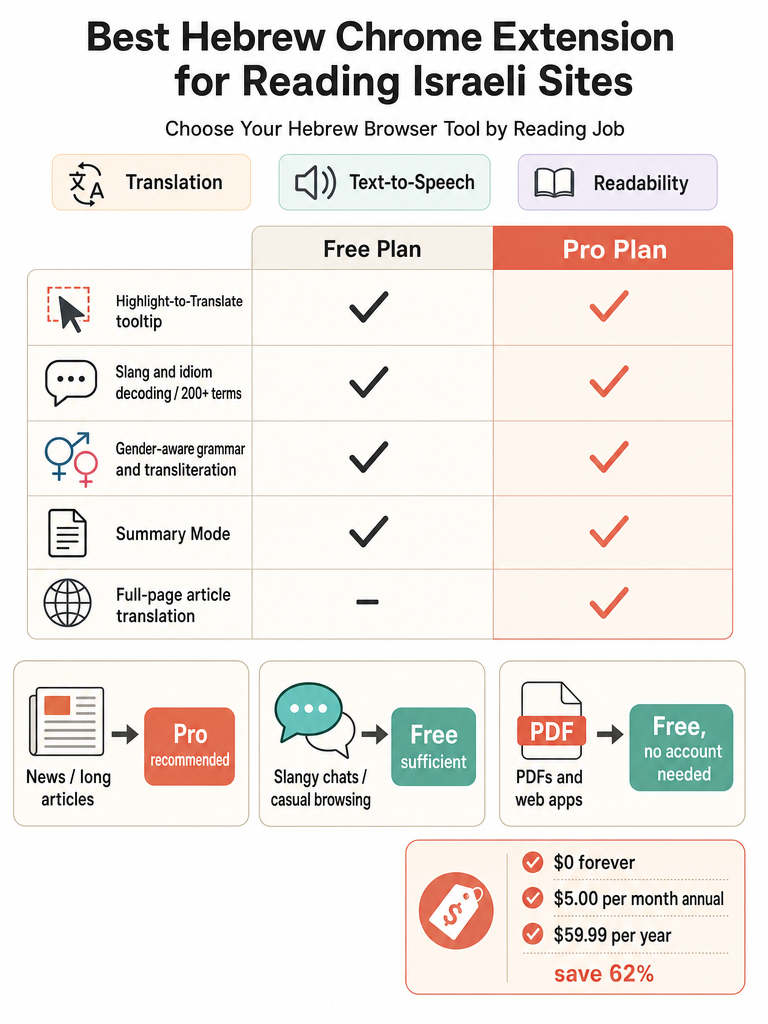
Pick your translation mode by how much you're reading. A quick word check needs a highlight tooltip. Understanding a five-paragraph article needs summary mode or full-page translation. baba's extension page lists highlight-to-translate, inline tooltips, transliteration, slang decoding, gender-aware output, and Summary Mode on the free plan, while full-page article translation sits on Pro (Source: baba).
Mode
Best for
Plan (baba)
Highlight tooltip
Checking a single word or short phrase
Free
Side panel
Slang, context, alternate gendered forms
Free
Summary mode
Getting the gist of a long article
Free (5x slang, 2x summary/mo per Chrome Web Store)
Full-page translation
Reading an entire article end to end
Pro
The free plan covers casual browsing. The Chrome Web Store listing puts free limits at 10,000 characters of translation per month and up to 2,000 characters per translation, plus 200 history items and 50 saved favorites (Source: baba Chrome Web Store).
If most of your reading is single confusing words on signs or menus, highlight-to-translate alone is enough. Full-length news habits push you toward Pro.
Are there any Chrome extensions that offer real-time Hebrew translation?
Real-time Hebrew translation comes in two flavors: instant highlight tooltips and always-translate page settings. With a highlight tooltip, you select Hebrew text and the translation appears immediately in place—baba shows translation, pronunciation, and gender the moment you highlight (Source: baba). With an always-translate setting, the browser converts a whole Hebrew page into English automatically when you land on it, as a YouTube walkthrough demonstrates for setting a page to always translate from Hebrew to English (Source: Rena Ernstein YouTube).
The difference is control. Instant tooltips keep the original Hebrew visible and let you check meaning word by word—better when you're learning and want to see the source. Always-translate replaces everything at once—faster when you just need the gist and don't care about the Hebrew.
For reading Israeli news at midnight before a bill is due, the walkthrough's own scenario, always-on is convenient. But it strips out the gender and slang context that matters when a sentence hinges on who's being addressed. Quick tooltips win when nuance counts; full-page conversion wins when speed is all you need.
Translator vs text-to-speech vs readability tool for Hebrew websites
Learners often install the wrong tool because these three jobs get lumped together. A translator gives you meaning. A text-to-speech reader lets you hear Hebrew aloud. A readability tool changes how the script looks without touching the words. You may want all three, but they solve different problems.
Tool type
What it does
Example (sourced)
Translator
Converts Hebrew to English meaning
baba Hebrew Translator
Text-to-speech
Reads Hebrew aloud
Voice Out; Read Aloud with Carmit voice
Readability
Adjusts Hebrew font, size, line height
Behirut
Voice Out positions itself as a Hebrew text-to-speech extension for webpages, PDFs, Google Docs, and books, and its page claims you can listen up to 3 times faster than average reading speed (Source: Voice Out). A Facebook post in a Hebrew learning group describes pairing browser translation with a voice reader, noting you can hear audio if you install a Hebrew text-to-speech voice like Carmit and use Read Aloud (Source: Free Hebrew Class Facebook group).
Behirut doesn't translate at all—its Chrome Web Store page says it makes Hebrew webpages easier to read by changing font, size, and line height, especially where niqqud is hard to see. The listing shows 141 users and a 4.0 rating from 2 ratings, last updated October 10, 2022 (Source: Behirut Chrome Web Store).
Older learner resources like Morfix, Reverso, AlmaReader, Microsoft Translator, and iTranslate appear in a Living in Israel Medium piece on Hebrew TTS, but that article notes Morfix has no Hebrew text-to-speech engine and AlmaReader only reads Hebrew rather than translating from English (Source: Living in Israel, Medium). For casual reading in your browser, a translator handles the meaning; add a TTS reader only if listening and pronunciation matter to you.
Is the baba Chrome extension free, and what changes when you pay?
Yes—the baba Hebrew Translator is free to install, needs no account, and works on every website (Source: baba). The extension page lists a Free plan at $0 forever, with highlight-to-translate, inline tooltips, transliteration, slang decoding, gender-aware output, and Summary Mode included (Source: baba). Paying unlocks full-page article translation and higher limits.
The free tier is genuinely usable for casual browsing. The Chrome Web Store listing details free limits as 10,000 characters/month, up to 2,000 characters per translation, 200 history items, 50 saved favorites, and trial access to Slang 5x and Summary 2x per month (Source: baba Chrome Web Store).
Pro raises those ceilings substantially: 250,000 characters/month (or 3 million/year on the annual plan) and up to 20,000 characters per translation (Source: baba Chrome Web Store).
Now the honest part—baba's own sources disagree on the Pro price:
Source
Monthly
Annual
baba extension page
$5.00/mo
$59.99/yr
baba Chrome Web Store
$12.99/mo
$59.99/yr
Both list the annual plan at $59.99/yr, and the extension page says the annual option saves 62% (Source: baba). The monthly figure is where they split. Check the current in-app price before subscribing, since the annual number is the one both sources agree on.
Where browser Hebrew translation matters most: news, email, PDFs, and everyday Israel tasks
Browser Hebrew translation earns its keep on the sites you already open daily—Israeli news, Gmail, government portals, apartment listings, and WhatsApp Web. Each one has its own traps, which is why reading in place beats generic word-swapping. baba's highlight-to-translate works on Israeli news, government sites, social media, PDF viewers, and email (Source: baba).
Here's where it maps to real tasks, with guides for each:
How to choose the best Hebrew translation extension for Chrome
Start by naming your job, then match it to translation, text-to-speech, or readability—the three don't overlap. A translator handles meaning, Voice Out reads aloud, and Behirut adjusts how Hebrew script displays. Picking the right category first saves you from installing a font tool when you needed translation.
Run through this checklist before you commit:
Job first. Reading for meaning, listening, or fixing hard-to-read script? Choose the category, not the "top" result.
Gender. Does it flag masculine and feminine forms? baba's side panel shows both (Source: baba). Gender errors are the fastest way to sound wrong.
Slang and idioms. Textbook translators miss what Israelis actually say—baba's page claims 200+ slang terms decoded (Source: baba).
Transliteration. If you can't read Hebrew letters yet, confirm the tool spells words phonetically in Latin script.
Site coverage. Test it on the pages you use—news, PDFs, Gmail, WhatsApp Web—not just a demo.
Account and limits. Some tools install with no account; match monthly character limits to how much you actually read.
Pricing. Watch for conflicting figures across a vendor's own pages, as baba's do ($5.00 vs $12.99 monthly), and verify the live price before subscribing.
For long articles, transliteration, and single confusing words alike, a Hebrew-first translator that reads meaning at the sentence level will serve you better than a dictionary-style tool. If you're weighing that difference, baba vs dictionary-only Hebrew tools for real sentences lays it out.
Ready to read Israeli sites without the copy-paste? Try the free web translator: Try the free web translator
Frequently asked questions
What are the top-rated Chrome extensions for translating Hebrew?
The best pick depends on your job. For translation — meaning, gender, and slang — baba Hebrew Translator works on any webpage with a highlight-to-translate tooltip, no copy-paste required. For hearing Hebrew read aloud, Voice Out handles text-to-speech on pages, PDFs, and Google Docs. For making dense Hebrew script easier to read, Behirut adjusts font, size, and line height. These three tools solve different problems and don't substitute for each other.
Which Chrome extension is best for translating Hebrew text accurately — especially gender and slang?
Accurate Hebrew translation requires handling grammatical gender, transliteration, and slang — not just vocabulary matching. baba's browser extension flags masculine and feminine forms with alternate versions in the side panel, spells every word phonetically in Latin script, and decodes 200+ slang terms including army slang, Mizrahi expressions, and WhatsApp shorthand. Generic dictionary-style tools skip all three, which is why their output sounds robotic even when the vocabulary is technically correct.
Is there a Chrome extension that offers real-time Hebrew translation without copy-pasting?
Yes — highlight-to-translate extensions show a translation the instant you select Hebrew text on any page. baba's extension displays the English meaning, pronunciation, and grammatical gender in an inline tooltip right where you're reading, with no tab-switching. A second option is setting your browser to always translate Hebrew pages automatically on load, which is faster but strips out gender and slang context that matters when a sentence turns on who's being addressed.
Is the baba Hebrew Chrome extension free, and what do you get on the paid plan?
The free plan costs $0 forever and includes highlight-to-translate, inline tooltips, transliteration, slang decoding, gender-aware output, and Summary Mode, capped at 10,000 characters per month and 2,000 characters per translation. The Pro plan raises those limits to 250,000 characters per month and 20,000 characters per translation, and adds full-page article translation. Both sources agree the annual plan is $59.99/year; the monthly price differs across baba's own pages, so check the current in-app figure before subscribing.
What's the difference between a Hebrew translator extension, a text-to-speech reader, and a readability tool?
A translator converts Hebrew into English meaning — that's what you need to understand an Israeli news article or government form. A text-to-speech reader like Voice Out reads Hebrew words aloud at up to 3x average reading speed but doesn't tell you what they mean. A readability tool like Behirut (141 Chrome Web Store users, 4.0 rating) changes font size and line height without touching the text at all. You may want all three, but installing the wrong one for your actual task wastes time.
Do I need full-page translation or just a highlight tooltip for reading Israeli sites?
It depends on how much you're reading. A highlight tooltip handles single words and short phrases — that's enough for scanning a sign, menu, or chat message. Summary Mode gives you the gist of a long article without translating every paragraph. Full-page article translation, which sits on baba's Pro plan, is the right tool for reading an entire news piece end to end. The free plan limits Summary Mode to 2 uses per month, so heavy article readers hit that ceiling quickly.