Practice a Hebrew voice notes reply by listening for the gist, drafting a short answer, and rehearsing it out loud before you send it.
How do you reply to a Hebrew voice note without freezing?
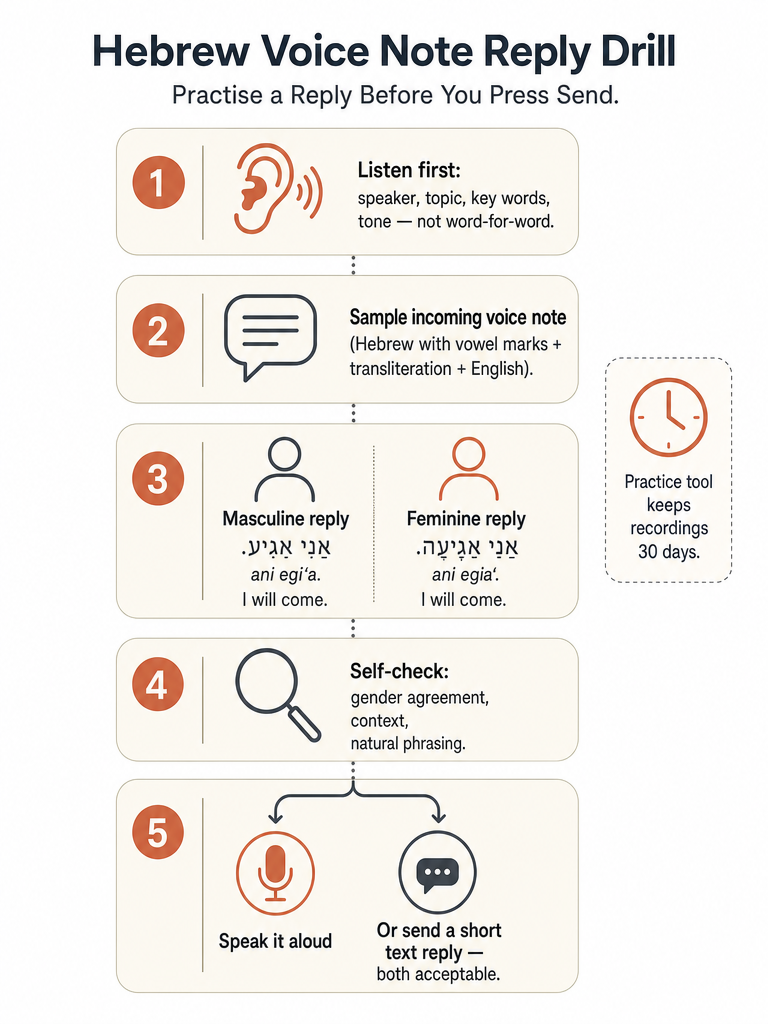
Replying to a Hebrew voice note without freezing follows four steps: listen once for the gist, draft a short reply, rehearse it out loud, then send a voice note or a short text back. A short text reply is a normal way to answer, according to a Hebrew-learning guide built around WhatsApp voice notes.
A Hebrew voice note is a short recorded audio message, typically exchanged on WhatsApp, where the speaker talks instead of typing. The freeze usually hits between step one and step two: you understood the message, but nothing comes out when you try to answer it. That gap is ordinary, not a sign you don't know enough Hebrew. Many adult learners build up passive vocabulary long before they can produce a sentence under time pressure, which is why rehearsing a reply out loud, even quietly to yourself, matters as much as learning new words. If most of your Hebrew has come from reading and flashcards, moving that vocabulary into real conversation practice is a separate skill that needs its own repetition.
What should you listen for before you try to translate every word?
A first listen to a Hebrew voice note should cover four things, not every word: who's speaking, the general topic, the handful of key words carrying the actual request, and the tone. Chasing a full word-for-word translation on the first pass is the main reason a message blurs together and you end up replaying it three times.
Speaker matters first, because it tells you whose grammatical gender you'll need to answer in later. Topic can usually be caught in one or two words, plans, work, a favor, before you've processed a full sentence. Key words are the names, times, places, and the one verb that carries the actual ask: is this person telling you something or asking you to do something? Tone separates a casual check-in from a real request with a deadline attached. A Hebrew-learning guide built around WhatsApp voice notes recommends this exact listening order and says catching every single word on a first listen isn't necessary.
A real Hebrew voice note to practice on
Here's a realistic voice note an Israeli friend might send about weekend plans, written with nikud, transliteration, and an English translation so you can check your ear against the text before you try to answer it.
Transliteration: Hey, ma nishma? Ani ve-Itai choshvim lalechet la-yam machar ba-boker, bi-svivot tesha. Ata ba? Tagid li ad ha-erev, ki anachnu tsrichim lehazmin monit.
English: Hey, what's up? Itai and I are thinking of going to the beach tomorrow morning, around nine. Are you coming? Tell me by tonight, because we need to book a taxi.
אַתָּה בָּא? (ata ba?) - "are you coming?": the actual request.
עַד הָעֶרֶב (ad ha-erev) - "by tonight": the deadline for replying.
Everything else in the message is color. Miss it on the first pass and you'll still have enough to answer.
Should you answer with a voice note or a short text reply?
A short typed reply is the right call when you're busy, unsure of a word, or just confirming logistics like a yes, no, or a time. Speaking your reply out loud is worth the extra effort when you want the practice itself, since producing a sentence under pressure is exactly the skill that reading and flashcards don't build.
A WhatsApp-focused Hebrew voice-note guide makes the same point directly: a short text reply is a completely normal response to a voice note, not a lesser one. For a learner, that means texting back "כן, אני בא!" closes the exchange just as well as a recorded reply would. The voice-note route stays available any time you actually want the rehearsal, since nobody on the other end is expecting you to use it.
Say it both ways: rehearsing a masculine and a feminine reply
The same reply to the voice note above changes two words depending on the grammatical gender of the person sending the reply, not the gender of whoever sent the original voice note: the verb for "coming" and the adjective for "ready." Hebrew marks the subject's gender on verbs and adjectives even in short, casual replies, which is why the same English sentence has two correct Hebrew versions, and only one matches you.
Ken, ani ba'a! Ehiyeh muchana bi-shmoneh va-chetzi.
Yes, I'm coming! I'll be ready at 8:30.
בָּא / בָּאָה and מוּכָן / מוּכָנָה are the only two words that move; the rest of the sentence, the time, the exclamation, the structure, stays identical. Once you've located the verb and the adjective describing yourself, the rest of the reply is reusable regardless of who sent the original message.
Say both versions out loud, even if only one applies to you. Hearing בָּא and בָּאָה back to back is what makes the pattern stick, the same drill the gender-endings practice page walks through using coffee and water instead of a beach trip.
How do you check that your drafted reply sounds natural, not translated?
A drafted Hebrew reply is ready to send once it passes four checks: does the verb match your own gender, does the phrasing fit a casual voice note instead of a formal letter, would an Israeli actually say it that way, and can you say it out loud without stumbling. Running through these takes under a minute and catches most of the stiff, overly literal replies before they go out.
Gender check. Reread your reply and confirm every verb and adjective matches your own gender, not the speaker's.
Context check. Strip anything that sounds like a formal letter opener. A voice note is casual, so "אני רוצה להודיע לך" doesn't belong next to "מה נשמע?"
Phrasing check. Ask whether the sentence sounds like something a friend would actually say, not a textbook line translated word for word.
Say-it-out-loud check. Speak the reply once before sending it. If your tongue trips on a word, simplify the sentence instead of forcing it.
What can you say if you freeze halfway through the reply?
Three short lines buy time or hand the conversation back without ending it awkwardly: a phrase that says you're thinking, a phrase that promises to answer shortly, and a plain request to repeat or slow down. None of them require finishing the sentence you froze on.
אֲנִי אֶכְתּוֹב לְךָ עוֹד מְעַט. (ani ekhtov lecha od me'at.) - "I'll write to you in a bit."
אֶפְשָׁר לוֹמַר שׁוּב? (efshar lomar shuv?) - "Can you say that again?"
Any one of these, said or typed, ends the pressure to produce a full answer immediately. Send it, gather the actual reply at your own pace, then follow up a minute later.
What kind of Hebrew speaking tool actually helps you practice a voice-note reply?
For rehearsing a spoken reply before you send it, the tools that help are built around live or recorded speaking and correction, not transcription. A plain speech-to-text app turns a voice note into words on a screen, which helps you understand a message but does nothing for producing your own reply out loud.
Tool
What it does
Where it helps this task
TalkIvrit (called Dibur during its pilot)
Live spoken conversation partner that suggests corrections after the call instead of scores. TalkIvrit says one trial conversation runs up to 90 seconds without creating an account, with trial data deleted after seven days.
A quick real-time run at a reply, with feedback on what you actually said
Ulpan AI
Chat and live calls with an AI partner; lets you send a voice note and get one back, and saves calls to review later. Ulpan AI says its app includes 250+ real-life phrases and 12 role-play scenarios.
Closest match for a voice-note-style exchange, since it accepts recorded voice notes directly
Fluently
Spoken conversation with corrections delivered during the call; separate pronunciation drills score sounds independently. Full conversations require its Premium tier.
Catching a grammar slip mid-conversation
SpeakBase
Short lessons, five to ten minutes each, built around role-plays. SpeakBase says its Premium tier is $11.99 a month and covers about 150 minutes of conversation.
Short, repeatable practice reps rather than one specific reply
The provided sources don't show any of these tools importing or transcribing an external WhatsApp voice note. Each one works from what you say inside its own app, not from audio you forward in.
baba Learn fits the same category: rehearsal, not transcription. It's a speaking app, currently in private beta on iPhone and Android, where you talk to an AI tutor named Maya or David and get corrections on what you said, with Hebrew shown in nikud and English or transliteration a tap away. Hebrew lines use your own grammatical gender throughout. baba Learn says Classic lessons start free with no card required, and its Pro tier carries its own usage allowances. Corrections come with an explanation you can revisit later, a process covered in how to use corrections from your Hebrew conversations.
Before practicing real spoken replies inside any of these tools, check three things: how long recordings are kept, whether you can delete what the tool remembers about you, and whether it ever imports audio from outside the app. baba Learn keeps voice recordings for 30 days so a score can be checked, then deletes them, while notes it saves about you stay until you delete them yourself. TalkIvrit lets you delete anything it remembers and automatically clears trial data after seven days. Ulpan AI saves every live call for later review, though its page doesn't describe a separate deletion control for that history.
None of this replaces forwarding a voice note between apps. baba Learn is built for rehearsing what you're going to say out loud, in your own words, before you answer the real message.
Frequently asked questions
What should I check in an AI Hebrew speaking tutor before paying for a subscription?
Test four things in the free tier first: whether conversations are genuinely unscripted rather than scripted drills, how many minutes you actually spend speaking versus listening, whether the tutor remembers details like your gender across a session, and how mistakes get explained rather than just flagged. Also check usage caps, renewal price, cancellation steps, and whether voice data is deleted or used to train models before you commit to a paid tier like Pro or Premium.
Is TalkIvrit free to use, and does everyone qualify?
TalkIvrit is free to use during its current pilot, called Dibur during this phase, and open to adults 18 and older. It isn't offered yet in the European Economic Area, the UK, or Switzerland while the pilot runs. Without creating an account you can try one trial conversation of up to 90 seconds, and that trial's data is deleted after seven days.
How much does SpeakBase cost for Hebrew conversation practice?
SpeakBase's Premium tier costs $11.99 a month and covers about 150 minutes of conversation practice, built around short five- to ten-minute role-play lessons. That's priced for repeatable short reps rather than one specific rehearsal, unlike apps built around a single live call or voice-note style exchange. Check current app-store pricing before subscribing, since tiers and allowances can change.
How long does baba Learn keep my voice recordings?
baba Learn keeps a voice recording for 30 days so a pronunciation score can be checked, then deletes it automatically. Separate notes the tutor saves about you, like your name or recurring mistakes, stay until you delete them yourself in Settings. TalkIvrit, by comparison, lets you delete anything it remembers and clears its own trial data after seven days.
Can I forward a WhatsApp voice note into a Hebrew speaking app for practice?
None of the Hebrew speaking apps built for this kind of practice, including baba Learn, TalkIvrit, Ulpan AI, Fluently, and SpeakBase, import or transcribe an external WhatsApp voice note; each one works only from what you say live inside its own app. The practical workaround is rehearsing your reply out loud inside one of these apps first, then typing or recording the actual answer back in WhatsApp yourself.
Is baba Learn available to download right now?
baba Learn is in private beta on iPhone and Android, not yet a public store launch, so access currently runs through a waitlist rather than a direct download. Classic lessons start free with no card required once you're in, and the Pro tier carries its own usage allowances. Joining the waitlist is the way to get an invite while the beta continues.