Hebrew Translation and Communication Apps
With your device set up, you're ready to dive into tools that make communicating in Hebrew a breeze. Even if you don’t know a single word of Hebrew, these apps can help you navigate conversations, read signs, and connect with locals during your Birthright trip.
baba: Your Go-To Hebrew Translation App

baba is a Hebrew translation app built to handle the unique quirks of the language, like gender-specific grammar and local slang. Unlike standard translators that often miss these nuances, baba ensures your Hebrew feels natural and contextually correct. It even adjusts based on whether you're addressing a man, a woman, or a group.
Available on both iOS and Android, baba comes packed with features like a Slang Mode, which not only translates phrases like "יאללה" (yalla) or "סבבה" (sababa) but also explains when and how to use them in real-life situations. Plus, it offers Hebrew transliteration in Latin characters, making it easier to practice pronunciation without needing to read Hebrew script.
Before your trip, download baba and test it out with a few phrases. The free version provides 7,500 characters per month - perfect for basic travel needs. For more intensive use, the Pro plan offers unlimited translations, voice input, and multiple speed options.
While baba is a fantastic resource, a few other tools can round out your communication arsenal:
-
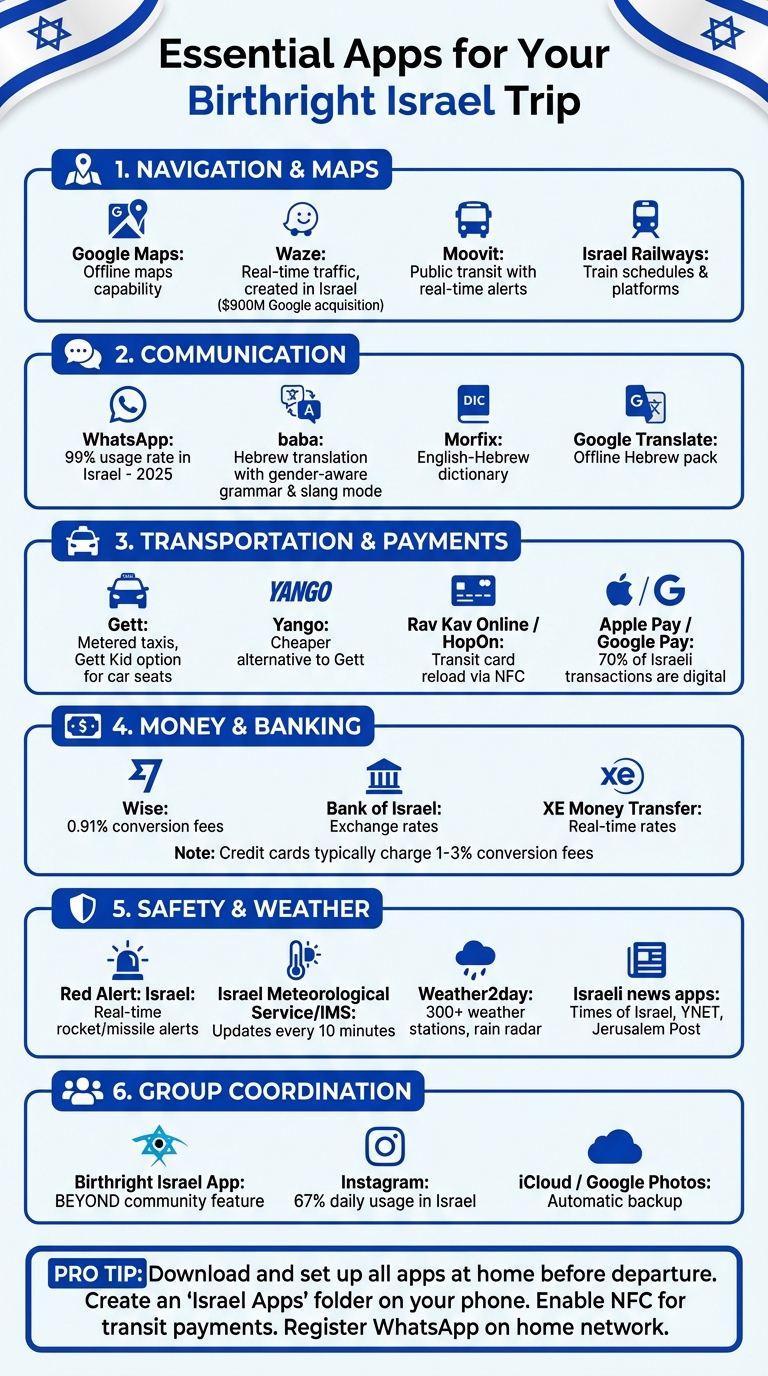
WhatsApp: This app is a must-have in Israel, where it's the main way people communicate - whether it’s your tour guide, a taxi driver, or new friends. Be sure to verify your number while still on your home network.
-
Morfix: A dedicated English-Hebrew dictionary that’s perfect for quick word lookups. It’s especially handy when you need to double-check specific words rather than entire sentences [2].
-
Google Translate: If you downloaded the offline Hebrew language pack earlier, this can be a lifesaver for translating signs, menus, or simple phrases when you’re out of Wi-Fi range.
Lastly, enable a Hebrew keyboard on your phone. Many apps and websites in Israel default to Hebrew, and having the keyboard ready will make typing a lot easier. With these tools, you’ll be well-equipped to navigate the language and make the most of your trip.
Getting Around: Navigation and Transit Apps
Traveling around Israel is simpler than you might expect - especially when you’ve got the right apps handy. Whether you’re navigating bustling city streets or hopping on public transit, these tools will help you get from point A to point B without a hitch during your Birthright trip.
Maps and Offline Directions
Google Maps is a must-have for walking directions and estimating travel times between cities. To stay on track even when your signal drops, download offline maps in advance. Just keep in mind that distances in Israel are measured in kilometers and meters, not miles.
For driving or ride-hailing, Waze is your go-to app. Created in Israel and later bought by Google for $900 million [6], Waze offers real-time updates on traffic jams, road hazards, speed cameras, and even police traps. It’s also great for finding specific spots like restaurants or hotels. That said, double-check its suggested routes - sometimes it may take you on a longer path to avoid traffic [3]. Once you’ve mastered road navigation, you can switch to transit-specific apps for a smoother travel experience.
Buses, Trains, and Intercity Travel
When it comes to public transportation, Israel’s transit apps are your best friends for longer trips. Moovit is the top app for navigating buses, trains, and light rail. It provides real-time updates and even sends alerts to let you know when to get off [7]. To play it safe, add an extra 15 to 30 minutes to Moovit’s travel time estimates to account for traffic delays.
For train travel, the Israel Railways app is a must. It gives you detailed information on schedules, platforms, and route planning [1][4]. These apps work well together - use Moovit for overall trip planning and the Israel Railways app for precise train details.
One thing to remember: public transportation in Israel stops running from Friday afternoon to Saturday evening for Shabbat. Be sure to check the apps for exact timings to avoid any surprises during your weekend plans [3].
Taxis and Local Transportation
Mapping out your route is one thing, but picking the right ride service ensures smooth local travel. Gett and Yango are reliable taxi apps to have on your phone. Gett is widely used and ensures drivers stick to the meter, while Yango often offers cheaper rides, especially in Tel Aviv [1][3][8]. To save time, set up your profile and payment method in these apps before arriving in Israel [6].
If you’re traveling with a small child, check out the "Gett Kid" option, which lets you request a taxi equipped with a car seat - perfect for family trips [9].
sbb-itb-7e51dcc
Money, Weather, and Safety Apps
Banking and Payment Apps
Once your navigation tools are sorted, it’s time to get your finances ready for travel. In Israel, digital payments are the norm - credit and debit cards account for nearly 70% of transactions[12]. To make things easier, set up Apple Pay or Google Pay on your phone before you go. These contactless payment methods are widely accepted at Israeli terminals and simplify everyday purchases[12].
For currency exchange, Wise is a great option with low, transparent fees (about 0.91%). You can also use apps like the Bank of Israel or XE Money Transfer to check real-time exchange rates. Keep in mind that standard credit card conversion fees typically range between 1% and 3%[13][11][1][12].
If you’re using public transit, don’t forget to load credit onto your digital transit card through the Rav-Kav Pass by Hopon app, as cash is no longer accepted by most transit drivers[1]. One note for U.S. travelers: Zelle won’t work internationally since both the sender and receiver need U.S.-based bank accounts and phone numbers[14].
Weather Apps
Israel’s climate can swing between desert heat and refreshing coastal breezes, so staying on top of the weather is key. The Israel Meteorological Service (IMS) app is the official weather resource, providing temperature updates every 10 minutes and issuing critical heat stress warnings for high-risk areas like the Judean Desert and the Jordan Valley[16]. The app is available in English, making it especially handy for Birthright participants.
For more localized forecasts, check out Weather2day. This app taps into over 300 ground-based weather stations across Israel and includes a rain radar that tracks storm movements with street-level precision[15]. It even offers real-time updates on sea conditions, which is great if you’re planning a beach day[15]. Most Israeli weather apps default to Celsius, but you can switch to Fahrenheit if that’s your preference[17].
Safety is always a priority, and there are apps to help you stay prepared. The Red Alert: Israel app provides real-time alerts for rocket or missile attacks, specifying the exact areas under threat[10]. Be sure to enable push notifications to get these updates instantly.
"Red Alert provides real time alerts every time a terrorist fires rockets, mortars or missiles into the State of Israel." - Kobi Snir, Developer[10]
For broader safety updates, download English-language Israeli news apps like The Times of Israel, YNET, or The Jerusalem Post. These will keep you informed about breaking news and local developments[2]. The official Birthright Israel app is another must-have. It consolidates all your program details, emergency contacts, and group information in one place[5].
Cultural Learning and Group Coordination Apps
Learning Hebrew and Israeli Culture
In Israel, WhatsApp is practically a necessity, with an impressive 99% usage rate in 2026 [19]. You'll rely on it not only to coordinate plans with your Birthright group but also to connect with locals and keep in touch with friends and family back home.
"In Israel just about everyone uses WhatsApp. So not only is it a great way to stay in touch with your family and friends back home, it will prove helpful in connecting with Israelis as well."
– Lauren Somers, Author, Israel First Hand [4]
For navigating the Hebrew language, baba is an invaluable tool. It’s designed to help you understand both formal Hebrew and the slang that’s common in everyday conversations. The app’s Slang Mode breaks down phrases like "אחי" (achi – "dude/bro") and "סבבה" (sababa – "cool/okay"), explaining when and how to use them in real-life situations. Plus, its transliteration feature spells out Hebrew words using Latin characters, making it easier to pronounce them if you're not comfortable reading Hebrew script yet. Baba even offers gender-aware translations to ensure your Hebrew sounds natural. Available on both iOS and Android, it’s a great way to dive into the language and culture.
With these tools at your fingertips, communicating effectively and immersing yourself in Israeli culture becomes much easier.
Staying Connected with Your Group
The Birthright Israel App makes group coordination a breeze. Its BEYOND community feature allows you to connect with other Birthright alumni, join group chats, and organize post-trip events like Shabbat dinners [18][20].
"BEYOND has been an absolutely incredible way for me to meet other staffers and participants from other trips and programs."
– Alexa, 2018 Alumni [18]
To streamline communication during your trip, set up a WhatsApp group for your Birthright cohort before you even leave. This will make sharing photos and updates effortless. And since 67% of Israelis use Instagram daily [19], you can use location tags and hashtags to document your experiences and create a digital scrapbook of your journey.
Photo Backup and Storage
Keeping your memories safe is just as important as creating them. Make sure to enable automatic cloud backups on your phone - whether you’re using iCloud on an iPhone or Google Photos on Android. This way, your photos are secure even if something happens to your device. Many translation apps also let you photograph Hebrew signs or historical markers and save the translated versions. These features not only preserve your memories but also add meaningful context to your photo collection.
Conclusion: Download These Apps Before You Go
Your Birthright adventure begins the moment you touch down in Israel, and having the right apps on your phone can make all the difference. Start with baba, your essential Hebrew translation tool. With features that account for gender and local nuances, baba helps you communicate effortlessly, understand slang, and navigate conversations like a pro. It’s available on both iOS and Android.
To make your trip even smoother, consider adding these apps to your arsenal: WhatsApp for staying connected with your group and locals, Moovit for navigating public transportation, Waze for real-time traffic updates, Gett or Yango for booking taxis, and Red Alert for staying informed about safety updates. Keep these apps organized on your phone so they're easy to access when you need them.
Before you leave, set everything up while connected to your home Wi-Fi. This helps you avoid unnecessary delays or data charges at the airport. Make sure your offline tools are ready, your cloud backups are up to date, and your phone is unlocked for international use. A little preparation now will save you a lot of stress later.
FAQs
What can I do if my phone doesn’t support NFC for public transit payments in Israel?
If your phone doesn’t have NFC capabilities, don’t worry - you can still get around Israel’s public transit system with ease. One option is to grab a physical Rav Kav smart card at any transit station. This card lets you load funds and pay for rides by simply tapping it.
Another convenient choice is using cashless payment apps like Bit or PayBox. These apps allow you to top up your account and handle transit payments without needing NFC.
With either approach, getting around Israel’s public transit system remains straightforward and stress-free.
What do I need to do to make sure my apps work with an Israeli SIM card?
To make sure your phone works seamlessly with an Israeli SIM card, confirm that your device is carrier-unlocked before your trip. Disable any SIM PINs, and once you insert the Israeli SIM, your phone should automatically set up the network. If it doesn’t, you can manually configure it by navigating to Settings → Mobile networks → Access Point Names. Still having trouble? Resetting your network settings often resolves most issues.
For those using eSIMs, activate it after you arrive by connecting to Wi-Fi and scanning the QR code provided by your carrier. After activation, switch off your U.S. line and disable any VPNs to prevent connectivity problems. If errors persist, resetting your network settings can help re-establish the connection.
What are the must-have apps for getting around on public transportation in Israel?
Navigating Israel’s public transportation system can be much easier with the right tools on your phone. Here are some must-have apps to download before your trip:
- Moovit: Your go-to for real-time transit updates, route planning, and schedules for buses and trains throughout Israel. It keeps you informed and on track.
- Google Maps: A trusted navigation app that offers detailed step-by-step directions, including public transit options, to help you get where you need to go.
- Rav-Pass (by HopOn): This app simplifies buying and managing digital tickets for buses and trains, making your travel hassle-free.
- Rav Kav Online: If you’re using a Rav Kav card - a reusable smart card for public transportation - this app lets you easily top it up on the go.
With these apps in hand, you’ll save time, reduce stress, and enjoy a smoother travel experience across Israel.
Frequently Asked Questions
How does a Hebrew translation app handle slang and idioms that generic translators get wrong?
Everyday Israeli slang like 'yalla' or 'sababa' carries tone and context that word-for-word tools completely miss. baba's Slang Mode doesn't just translate these phrases — it explains when and how to actually use them, so you sound like someone who gets the culture, not someone reading off a phrasebook.
Do I need to read Hebrew script to use a translation app in Israel?
Not at all — transliteration features spell out Hebrew words in Latin characters so you can pronounce them without knowing the alphabet. This is especially useful for reading signs, menus, or chatting with locals when you're still getting comfortable with the language.
Why does Hebrew grammar matter so much when translating from English?
Hebrew changes verb and adjective forms based on the gender of who you're addressing, so the same English sentence can translate differently depending on whether you're talking to a man, a woman, or a group. A tool that ignores this will produce phrases that sound awkward or even rude to native speakers.
What should I do about data and Wi-Fi before arriving in Israel?
Download offline maps and any offline language packs before you leave home, and set up all app accounts while still on your home network — especially anything that requires SMS verification like WhatsApp or ride-hailing apps. Unlocking your phone ahead of time lets you drop in an Israeli SIM or activate an eSIM right at the airport without scrambling.
Is public transportation really shut down on Shabbat in Israel?
Yes — most public buses and some train lines stop running from Friday afternoon until Saturday night across the country, though some cities like Tel Aviv have limited service. Check Moovit or Israel Railways for exact cutoff times so weekend plans don't leave you stranded, and have Gett or Yango ready as a backup.