English to Hebrew translation with automatic transliteration, gender-aware grammar, and native-sounding sentences for chats, signs, and travel.
What is the best English to Hebrew translator with transliteration?
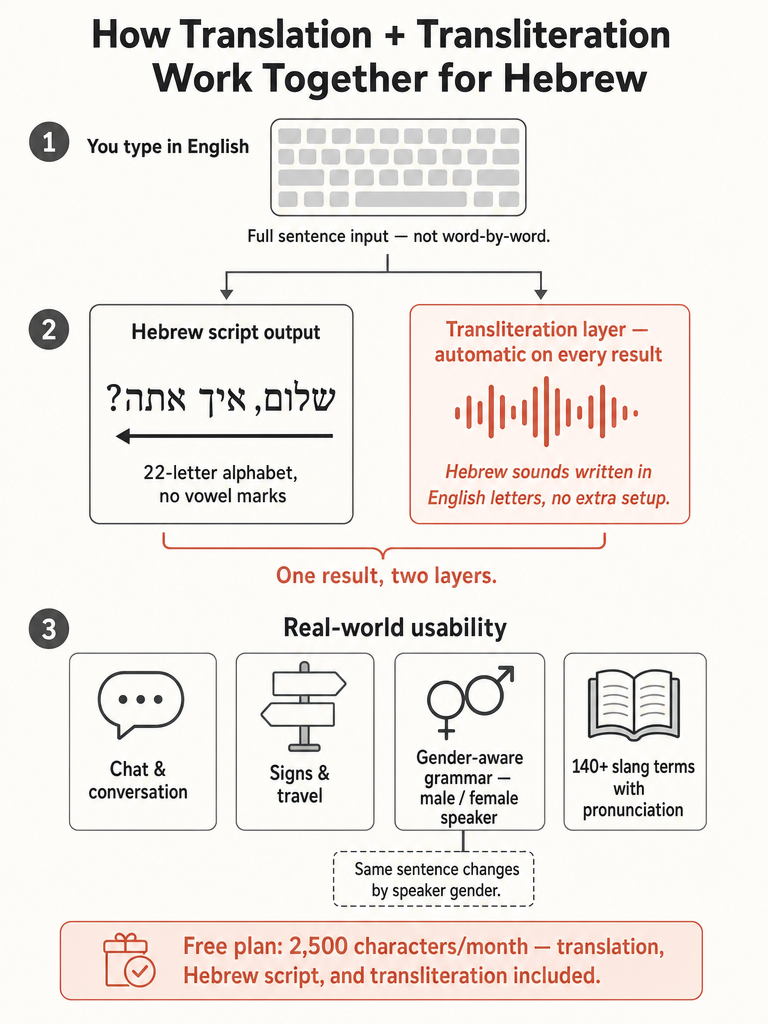
The best English to Hebrew translator with transliteration converts full English sentences into natural Hebrew and shows the pronunciation in English letters on the same result. That combination matters because Hebrew uses a right-to-left alphabet of 22 letters and gendered grammar most beginners can't read yet (Source: baba). baba's homepage says it has delivered 100,000+ translations and holds a 4.8-star App Store rating.
There's no independent, universal accuracy ranking in the public record for this exact use case, so ignore any tool that claims to be "the objectively most accurate." What you can compare is concrete: whether the tool handles sentence-level meaning, whether it gets Hebrew gender right, and whether transliteration appears automatically or forces a second lookup.
For English speakers who can't read Hebrew script, the deciding feature is pronunciation on every result. A dictionary that maps single words won't help you say a sentence at a bus stop. A tool that translates the whole thought—and shows you how to speak it—will.
How do I translate English to Hebrew with pronunciation?
To translate English to Hebrew with pronunciation, type your English sentence, read the Hebrew output, then use the transliteration line below it to say the words aloud in English letters. baba shows pronunciation in English letters automatically on every Hebrew result, so you don't set up a separate romanization step (Source: baba).
Here's the workflow most people follow before sending a chat or reading a sign:
Enter your full English sentence, not single words—meaning comes from the whole thought.
Read the Hebrew translation the tool returns.
Check the transliteration line (for example, "ani mamash smecha shenifgashnu") to hear how it sounds.
Set speaker and listener gender if the tool supports it, so the Hebrew matches who's talking.
Hebrew transliteration writes Hebrew sounds in English (Latin) letters so you can read and pronounce Hebrew without knowing the Hebrew alphabet (Source: baba). It's not translation. Translation gives you the meaning of a phrase; transliteration gives you the pronunciation. The classic example: שָׁלוֹם becomes "shalom" (Source: A Little Hebrew).
The reason pronunciation help matters comes down to the script itself. Hebrew uses 22 letters written right-to-left, a system most English speakers can't decode on sight (Source: baba). Seeing "shalom" in familiar letters lets you speak the word immediately, even if the Hebrew characters mean nothing to you yet.
Transliterating into Roman letters is called Romanization; the same process into Cyrillic is Cyrillization (Source: A Little Hebrew). For English speakers, Romanization is the one that counts.
Translation answers "what does it mean?" while transliteration answers "how do I say it?" You often want both at once, which is why the strongest tools show them together on a single result. For a deeper walkthrough, see our Hebrew transliteration guide for English speakers.
Can I read Hebrew in English letters before I learn the alphabet?
Yes—transliteration lets you speak Hebrew before you can read Hebrew script, which is exactly what travelers and first-week beginners need. Seeing "toda raba" instead of תודה רבה means you can say "thank you very much" on day one, without decoding 22 right-to-left letters first (Source: baba).
The honest caveat: transliteration approximates sound. It doesn't replace Hebrew literacy. Roman letters can't capture every Hebrew sound perfectly, and there's no single official spelling system, so "chai" and "khai" may point to the same word. For a name on a legal document or a word you'll read repeatedly, learning the script still wins.
For everyday speaking—ordering coffee, greeting a host, asking directions—transliteration is enough to get you talking. Think of it as training wheels that get you moving while you learn the alphabet in parallel. When you're ready to read the characters themselves, our complete beginner's guide to the Hebrew Aleph-Bet covers the letters and right-to-left reading.
Does an English to Hebrew translator show transliteration automatically?
The better English to Hebrew translators show transliteration automatically on every Hebrew result, so you never run a second romanization step. baba states that pronunciation in English letters appears on every Hebrew output, and it works both directions—type English to get Hebrew with phonetic transliteration, or scan Hebrew and read the pronunciation back (Source: baba).
Automatic beats manual for one practical reason: friction. Some tools treat transliteration as a separate feature or a premium add-on rather than a default. Quillbot, for example, lists transliteration among its Premium features, and its Romanization is aimed at languages like Chinese and Hindi rather than Hebrew by default (Source: Quillbot). Steve Morse's transliteration tool does English-to-Hebrew phonetically, but it's a standalone converter, not a full sentence translator, and it dates to 2003 (Source: Stephen P. Morse).
If you can't read Hebrew yet, one extra lookup per phrase adds up fast in a real conversation. Automatic pronunciation on every result is what makes a translator usable at a checkout counter or in a live chat.
If you want to see automatic transliteration in action, try the free web translator and paste in a sentence you'd actually send.
Which Hebrew translator handles gendered grammar best?
The best-fit tool for gendered Hebrew lets you set who's speaking and who's listening, then adjusts verb forms to match. baba says it asks who is speaking and who is listening and conjugates for that context, rather than defaulting to masculine forms, and offers exactly those speaker-and-listener controls (Source: baba). Gender matters here because the same sentence changes depending on whether the speaker is male or female, and on the gender of the person being addressed—"I'm proud of you" isn't one Hebrew sentence, it's several.
A translator that ignores this defaults to masculine and sounds textbook-stiff. baba frames itself as gender-aware by design rather than retrofitted from an English-first engine. In its own example, a generic tool renders "I'm proud of you, sis" with a masculine-defaulting, formal-sounding line, while baba produces a female-speaker, sister-to-sister version with the natural Israeli "ממש" (Source: baba).
There's no independent third-party benchmark in the public record ranking translators on Hebrew gender accuracy, so treat any "best-in-class" gender claim as a vendor statement, not a verified test result. What you can verify yourself is simple: type a sentence, switch the speaker gender, and check whether the verb form actually changes.
Translation plus transliteration vs phonetic typing: which do you need?
Translation with transliteration and phonetic typing solve two different problems. Translation-with-transliteration takes your English, produces natural Hebrew, and shows the pronunciation—so you understand and can speak. Phonetic typing does the reverse job: it lets you type Hebrew letters using an English keyboard, which is an input method, not a translation.
You need translation-plus-transliteration when your goal is to communicate a full thought and say it out loud. You need phonetic typing only when you already know the Hebrew words and just need to enter the characters. Phonetic keyboards map English keys to Hebrew letters, which helps typists but does nothing for meaning.
Standalone transliteration converters, like Steve Morse's tool, offer accent options such as Sephardic and Ashkenazi but stop at pronunciation—they don't translate sentences (Source: Stephen P. Morse).
Task
What you need
Say a full English idea in Hebrew
Translation + auto transliteration
Understand and pronounce at once
Sentence translation with pronunciation
Type Hebrew words you already know
Phonetic typing / Hebrew keyboard
Just see how one Hebrew word sounds
Standalone transliteration converter
For most travelers, learners, and messaging, the first two rows are the real need. A word-by-word or keyboard-only tool leaves you short in an actual conversation.
When can Hebrew transliteration be wrong or confusing?
Hebrew transliteration goes wrong most often because there's no officially correct way to write Hebrew in Roman letters—choices vary by pronunciation system and audience (Source: A Little Hebrew). That's why Hanukkah, Chanukah, and Hanukah all show up for the same word, and none is strictly "the" spelling.
Accent is the second trap. The same Hebrew word renders differently in Sephardic and Ashkenazi pronunciation: שַׁבָּת is "shabbat" in a Sephardic accent and "shabbos" in an Ashkenazi one—both correct, but suited to different contexts (Source: A Little Hebrew). Modern Israeli speech uses the Sephardic-based standard, so that's usually your default for travel and daily talk.
The third issue is missing vowels. Hebrew is often written without vowel points (nikud), and when a tool transliterates unvocalized text, the output can collapse into unclear consonant clusters that are hard to read aloud (Source: A Little Hebrew).
Our Hebrew transliteration guide covers when to choose sounds for speaking versus letters for names and records.
Is there a free English to Hebrew translator with transliteration?
Yes, free English to Hebrew translation exists, but free limits and transliteration availability differ sharply by tool. baba's free plan includes gender-aware text translation up to 2,500 characters a month, with transliteration on results and no account required; Pro runs $12.99/mo or $59.99/yr with a 30-day free trial on the yearly plan (Source: baba).
Compare the free thresholds before you commit to a workflow:
Tool
Free allowance
Transliteration
baba
2,500 characters/month, gender-aware
Automatic on every Hebrew result
Quillbot
Up to 5,000 characters free
Listed as a Premium feature
Lingvanex
Up to 3,000 characters at once; 1,000 requests/day
Not stated in source
Quillbot supports 52 languages and dialects and puts transliteration behind Premium (Source: Quillbot). Lingvanex allows 3,000 characters per translation and 1,000 requests a day (Source: Lingvanex). Public detail on whether either includes Hebrew transliteration automatically is limited.
The practical read: character caps matter less for short chats and signs, more for longer text. And "free translation" isn't the same as "free transliteration"—check which features sit behind a paywall for the exact Hebrew use case you care about.
What is the best Hebrew translator app for English speakers in real situations?
The best Hebrew translator app for English speakers is the one that fits the real situation in front of you—signs, chats, menus, or a live conversation—not just isolated word lookup. baba's mobile app supports voice input, a live two-way conversation interpreter, camera translation for menus and signs, and a slang dictionary with 140+ real Israeli terms and pronunciation (Source: baba).
Dating and warm messages: Set speaker and listener gender before sending, per our guide to flirty, natural Hebrew texts.
For trip planning, our roundup of the best Hebrew translator app for travel in Israel shows when camera, voice, or offline phrases matter most. There's no single winner for every job; pick the surface that matches your task. baba's app is free to start with no account (Source: baba).
How should teams choose tools for longer Hebrew text, documents, and site content?
Teams handling longer Hebrew text should extend the same checklist to documents and publishing: natural sentence-level output, gender and tone control, and editorial review—not raw machine output dumped into a CMS. Full PDF and image translation on mobile covers one-off documents (Source: baba), but scaled localization needs more structure.
The gap most tools leave open is editorial control. General-purpose cloud translators bill by volume and speed—Amazon Translate charges $15 per million characters for standard translation and $60 per million for Active Custom Translation, while Azure AI Translator's free tier covers 2 million characters per month (Source: Amazon Translate; Azure AI Translator). Those are throughput numbers, not quality-of-Hebrew guarantees, and they say nothing about handling gender, slang, or Israeli tone in published copy.
For content teams, the checklist looks different:
Article and CMS translation that preserves meaning, not word order.
Editorial review workflow so a human signs off before publish.
Gender-correct, natural phrasing consistent across a whole site.
Scale without losing the tone that makes copy read like it was written by an Israeli, not translated into Hebrew.
baba positions its Meridian enterprise products for exactly this—article translation, editorial workflows, and full-site localization on the same gender-aware engine (Source: baba). Public side-by-side testing of Hebrew localization workflows across vendors is limited, so run a pilot on real content before you standardize. For a related deep dive, see our human-AI workflow for Hebrew legal translation.
What is the best English to Hebrew translator with transliteration?
The strongest option automatically pairs every Hebrew translation with pronunciation in English letters — no second lookup required. baba delivers both on the same result, built on a Hebrew-first engine that asks who is speaking and who is listening and conjugates for that context, and holds a 4.8-star App Store rating across 100,000+ translations. The real test: paste a full sentence, not one word, and check whether the Hebrew sounds natural and the phonetic line appears instantly.
Best Hebrew translator for gendered grammar — which tool actually handles it?
baba is purpose-built for this: it asks who is speaking and who is listening and conjugates for that context, and lets you set both speaker and listener gender before translating. That matters because Hebrew changes verb and adjective forms depending on who's talking and who's being addressed. Tools without gender controls default to masculine and sound textbook-stiff — the same sentence like "I'm proud of you, sis" produces noticeably different, more natural output when gender context is set correctly.
What is Hebrew transliteration and how is it different from translation?
Transliteration writes Hebrew sounds in English letters so you can pronounce words without knowing the Hebrew alphabet — שָׁלוֹם becomes "shalom." Translation gives you meaning; transliteration gives you pronunciation. Hebrew uses 22 right-to-left letters most English speakers can't decode on sight, so seeing "toda raba" lets you speak "thank you very much" immediately. The strongest tools show both on a single result rather than forcing a separate lookup.
Pricing for English to Hebrew AI translator — what does it actually cost?
baba's free plan covers gender-aware text translation up to 2,500 characters a month with automatic transliteration and no account required. Pro is $12.99/month or $59.99/year, with a 30-day free trial on the annual plan; that tier adds voice input, camera translation, PDF translation, and conversation mode. For comparison, Quillbot's free tier allows up to 5,000 characters but lists transliteration as a Premium feature rather than a default.
Best Hebrew translation apps for English speakers in 2026 — what should I look for?
Match the app to your real situation: camera translation for signs and menus, sentence-level output with gender control for chats, and a slang dictionary for casual Israeli conversation. baba's mobile app covers all three — it includes 140+ Israeli slang terms with pronunciation, a live two-way conversation interpreter, voice input, and camera translation, free to start on iOS and Android with no account. A standalone dictionary or phonetic keyboard won't carry you through a live exchange.
Best AI Hebrew translator for native-sounding phrasing — how do tools differ?
The gap shows up in idioms and tone, not vocabulary. A generic tool translates "break a leg" literally — the listener thinks you're describing an injury. A context-aware engine translates the meaning: "she wished me luck before the audition." baba builds on a Hebrew-first engine trained for Israeli phrasing, including the casual intensifier "ממש" that native speakers use naturally. Tools retrofitted from English-first models tend to produce output that reads as formally correct but culturally flat.