
Listen to Hebrew Text
Type or paste Hebrew and press Play. This box reads with the Hebrew voice built into your device or browser, so it is free and sounds different on every device. The native Israeli ElevenLabs voices described below are in the baba app, with Pro.
Reading uses the voice installed on your device, so it sounds different on every device and browser.
No Hebrew voice? Add one, then reload this page:
- iPhone or iPad: Settings › Accessibility › Spoken Content › Voices, then download a Hebrew voice.
- Android: Settings › Text-to-speech, choose the engine and download its Hebrew voice data.
- Windows: Settings › Time & language, add Hebrew with its speech option, or open this page in Microsoft Edge.
- Mac: System Settings › Accessibility › Spoken Content › System voice › Manage Voices, then add a Hebrew voice.
Key Takeaways
- Free in your browser: paste Hebrew in the box above and hear it with your device’s Hebrew voice.
- Native Israeli accent in the baba app, powered by ElevenLabs v3: real intonation, stress, and rhythm.
- Male and female Hebrew voices, both correct on gendered Hebrew grammar.
- Replays use no quota: once audio is generated, it is cached and replayable forever.
- Up to 300 characters per clip; a Pro feature with 5,000 characters/month, up to 60,000/year on Pro Yearly.
- Available when translating to Hebrew on iOS and Android. TTS is a Pro feature.
Does ElevenLabs Support Hebrew Text to Speech?
Yes. ElevenLabs supports Hebrew through its multilingual v3 model, and its Hebrew voice quality is currently the best available, noticeably more natural than Google or Apple system TTS. baba runs those exact ElevenLabs v3 Hebrew voices inside the app, so you do not need your own ElevenLabs account, API key, or subscription to hear native-sounding Hebrew. The catch with any Hebrew TTS is that Hebrew is written without vowel marks (niqqud), so the engine has to guess how unpointed words are pronounced. baba removes that guesswork: it translates and disambiguates each sentence with context and gender first, then sends clean, resolved text to ElevenLabs, which is why pronunciation lands correctly far more often than pasting raw Hebrew into a generic TTS box.
| Hebrew TTS option | Voice quality | Handles unpointed Hebrew | Cost |
|---|---|---|---|
| baba (ElevenLabs v3) | Native Israeli, expressive | Yes: context-resolved first | Pro, 300 chars/clip |
| ElevenLabs direct | Native Israeli, expressive | Partial: you supply clean text | Paid account + API |
| Google / Apple TTS | Flat, robotic | Weak: frequent stress errors | Free |
If you just want to hear Hebrew spoken naturally without wiring up an API, the fastest path is the baba app on iOS or Android. For the broader translation workflow behind the audio, see our 2026 Hebrew translators guide and the learn Hebrew app overview.
Hebrew Speech That Tracks Real Israeli Intonation
ElevenLabs v3 Voices
The current state of the art for Hebrew TTS. Stress, vowel reduction, and the characteristic Israeli sentence-final rise are preserved, not the flat phoneme-by-phoneme output of system TTS.
Male & Female Voices
Two distinct delivery profiles: a slightly more formal female voice for news-style and workplace Hebrew, and a more conversational male voice for casual phrases and dialogue practice.
Unlimited Replays
Cached audio is free to replay forever. Shadow a phrase 50 times for pronunciation drills without burning a single character of your monthly quota.
Built for Unpointed Hebrew
Modern Hebrew is rarely written with niqqud (vowel marks), so reading alone leaves you guessing how a word actually sounds. baba’s TTS makes the vowels and stress placement audible immediately.
How Text-to-Speech Works in baba
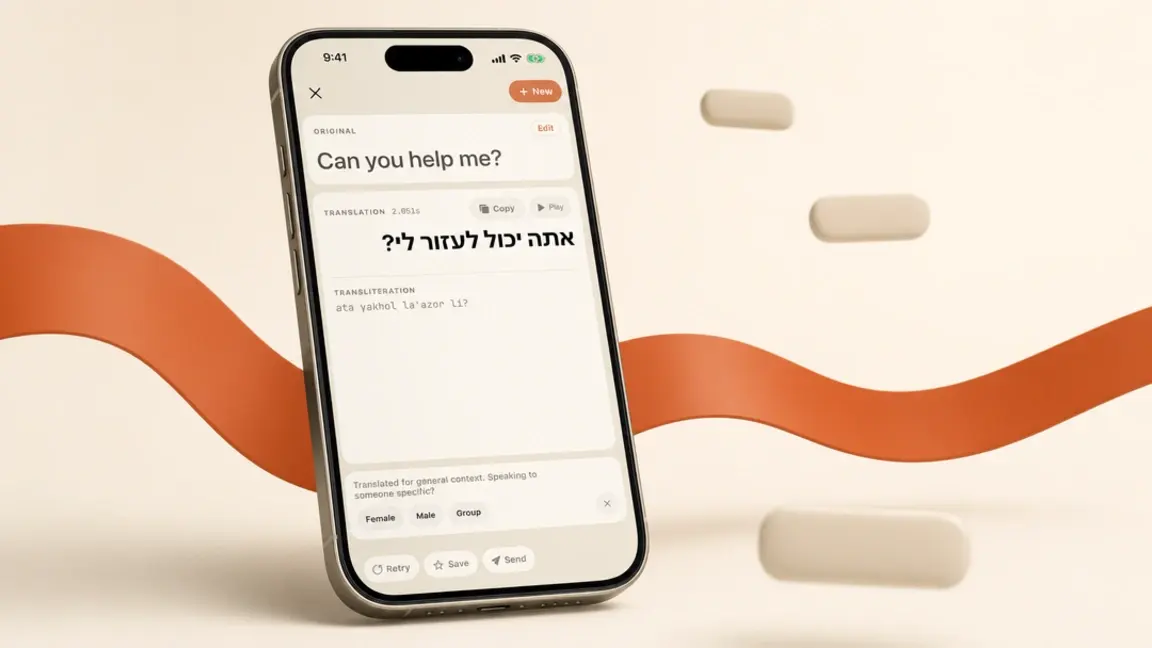
Translate to Hebrew
Translate any text to Hebrew with gender and context accuracy
Click Play
Tap the audio button to generate natural Hebrew speech
Listen & Learn
Hear an audio rendering and compare it with the transliteration
Replay Anytime
Audio is saved - replay as many times as you need
Perfect for Hebrew Learners
Hebrew Students & Ulpan Learners
Hear how unpointed Hebrew actually sounds, not how you guessed it would. Drill stress placement (oneg vs onag), guttural ח and ע, and the dropped vowels of fluent speech.
Travelers and Olim
Practice the phrases you will actually use (at the shuk, at the bank, on a sherut) with the right accent before you land in Tel Aviv. Sound less like a tourist and more like you live here.
Business and B'nei Mitzvah Prep
Practice Israeli colleagues’ names, company terms, and key phrases ahead of a meeting. Ideal for B'nei Mitzvah students drilling parsha pronunciation and trope-adjacent phrases.
Text-to-Speech Availability
| Plan | Monthly Limit | Replays |
|---|---|---|
| Free | Pro feature | Not included |
| Pro Monthly | 5,000 characters/month | ✓ Unlimited |
| Pro Yearly | 60,000 characters/year | ✓ Unlimited |
* Only available when translating TO Hebrew (English → Hebrew)
Text-to-Speech FAQ
Can I hear Hebrew text without the app?
Yes. The box at the top of this page reads any Hebrew you type or paste, free and without signing up, using the Hebrew voice built into your device or browser. The quality depends on that voice, and some browsers have none: on Windows, Microsoft Edge has Hebrew voices built in. For the native Israeli ElevenLabs voices described on this page, use baba on iPhone or Android with Pro.
Does ElevenLabs support Hebrew text to speech?
Yes. ElevenLabs added Hebrew to its multilingual v3 model, and the Hebrew voice quality is the best currently available, far closer to a native Israeli speaker than Google or Apple system TTS. baba uses ElevenLabs v3 Hebrew voices directly, so you do not need an ElevenLabs account or API key: you get the same engine inside the baba app. Text-to-Speech is a baba Pro feature, with up to 300 characters per clip.
How good is ElevenLabs Hebrew voice quality?
ElevenLabs v3 Hebrew voices preserve real Israeli intonation, lexical stress (oneg vs onag), guttural consonants (ח, ע, ר), and the sentence-final rise that flat engines flatten out. The main weakness of any Hebrew TTS is unpointed text, since Hebrew is written without vowel marks. So baba translates and disambiguates the sentence first, then sends clean, context-resolved text to ElevenLabs for the most accurate pronunciation.
How natural does the Hebrew text-to-speech sound?
baba uses ElevenLabs v3 voices tuned on native Israeli speakers. Intonation, pacing, and stress patterns track real spoken Hebrew rather than the flat, robotic delivery you hear from system TTS. Vowel reduction (e.g., the way "shalom" softens in fluent speech) and the characteristic Israeli sentence-final rise are preserved. For language learners this matters enormously: you absorb the rhythm of Hebrew, not just the phonemes.
Are the voices Israeli or Mizrahi-accented Hebrew?
The default voices are standard Modern Israeli Hebrew, the General Israeli accent you would hear on Channel 12 news or in Tel Aviv. We do not currently offer separate Mizrahi, Haredi, or Yemenite-accented voices. If you are studying for a specific community, the General Israeli accent is the most useful starting point and the one almost universally understood.
What is the difference between the male and female Hebrew voices?
Beyond pitch, the two voices have distinct delivery profiles. The female voice tends slightly more formal and is well suited to learners practicing news-style or workplace Hebrew. The male voice is slightly more conversational and works well for casual phrases, dialogue practice, and shadowing exercises. Both handle gendered Hebrew correctly: a verb in feminine form will be spoken by either voice without distortion.
Why does pronunciation matter so much in Hebrew?
Hebrew has stress placement that changes meaning (oneg vs onag), guttural sounds (ח, ע, ר) that English speakers often skip, and vowel-deletion patterns in spoken Hebrew that are not written in unpointed text. Hearing audio is the only reliable way to learn how a written word actually sounds. Hebrew is rarely written with niqqud (vowel marks), so reading alone leaves you guessing.
Do replays use my monthly character limit?
No. Once audio is generated, it is cached locally on your device. You can replay any phrase unlimited times (for shadowing, pronunciation drills, or just to memorize the rhythm) without burning through your monthly characters. New text counts toward the limit; replays of existing audio never do.
How long can a single Hebrew audio clip be?
Up to 300 characters per clip, which covers most full sentences and short paragraphs, about 50 to 60 words of Hebrew. This is intentionally calibrated for pronunciation practice, not audiobook generation. For longer practice sessions, translate and play multiple sentences in sequence.