How do I read a Hebrew menu without guessing wrong?
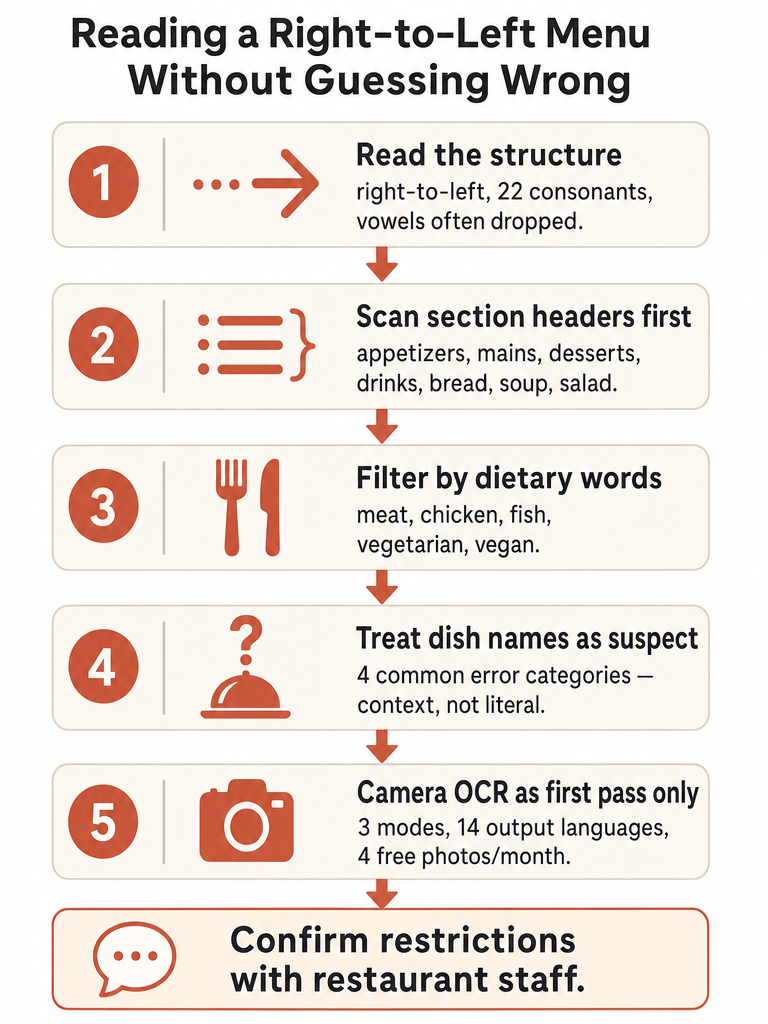
Reading a Hebrew menu starts with structure, not vocabulary. Hebrew runs right to left, and the script uses 22 consonants with vowels often left out entirely on modern menus (Source: Talkpal). That means a short-looking word can carry a lot of meaning, and recognizing root letters matters more than sounding out every character.
Here's the workflow that keeps you from guessing wrong:
- Read right to left. Your eyes start at the top-right of the page, not the left.
- Scan section headers first. Talkpal recommends orienting around the big category labels before you commit to any single dish.
- Translate the category and dietary cues before the dish names. Knowing a section is fish or vegetarian narrows your choices fast.
- Treat dish-name output as a starting point, not the final answer. A literal rendering often misses what's actually on the plate.
The reason this order works is simple: section headers and dietary words are stable and predictable, while individual dish names are where literal translation goes sideways. Get the structure first, then drill into specific dishes once you know what part of the menu you're in.
What are the major sections of a menu to translate first?
The fastest path through a Hebrew menu is to find the section headers before you read a single dish. Talkpal advises orienting around these category labels first, because they tell you where to focus and what to skip. A menu that looks dense becomes manageable once you've located which block holds the food you actually want.
The supported menu sections worth recognizing first:
| Section type | What it covers |
|---|---|
| Appetizers | Starters, small plates |
| Soup / Salad | Lighter openers |
| Bread | Bread and bread-based items |
| Main courses | The core of the meal |
| Meat / Chicken / Fish | Protein-based mains |
| Vegetarian / Vegan | Plant-based options |
| Desserts | Sweets and end-of-meal items |
| Drinks | Beverages |
Find the section that matches your meal, then read only the dishes inside it.
Scanning this way means you never have to translate the whole menu word by word. You jump to the block you need, then narrow down. For travelers and learners, this is the difference between standing frozen at the counter and ordering with confidence in under a minute. Translate the categories and dietary words first, and the rest of the menu stops being intimidating.
Which Hebrew menu labels tell you meat, chicken, fish, vegetarian, or vegan?
Your first filter on any Hebrew menu should be the protein and dietary labels: meat, chicken, fish, vegetarian, and vegan. These are the words that decide whether a dish is even an option for you, before taste or price ever come up. Talkpal's menu vocabulary covers these basic ingredient and dietary categories as the foundation for reading any Israeli menu.
Knowing these labels does the heavy lifting:
- If you eat plant-based, the vegetarian and vegan sections tell you where to look immediately.
- If you avoid certain proteins, the meat, chicken, and fish labels rule whole blocks of the menu in or out.
- If you're scanning fast, these words appear often enough that recognizing even a few keeps you oriented.
The corpus supports these basic categories, and that's where we'll stop. There's no reliable deep glossary here for every ingredient, sauce, or preparation term, so don't treat a handful of recognized words as a full menu translation. Use the labels to filter, then confirm specifics another way.
How to translate a foreign menu when Hebrew dish names are not literal?
Hebrew dish names rarely survive a word-for-word translation, which is exactly why menus trip people up. MotaWord warns that literal Hebrew-to-English translation can be technically correct yet awkward, unclear, or misleading, because Hebrew words and expressions often carry multiple possible English meanings. A dish name is meaning plus culture, not a string of words to swap one at a time.
MotaWord groups most Hebrew-to-English errors into 4 categories: grammar and syntax differences, literal word-for-word translation, misreading context or tense, and missing cultural nuance (Source: MotaWord). Menu names hit at least two of those at once.
Consider the dishes Talkpal lists for Israeli menus:
- Hummus, falafel, shakshuka, sabich, shawarma — these are names, not descriptions. A literal breakdown tells you almost nothing about what arrives on the plate.
- Borrowed words like פיצה (pizza) are the easy case — familiar-looking and safe to recognize on sight.
The takeaway: when a dish name is a proper culinary term, don't trust a literal rendering. Context-aware translation that preserves meaning and cultural intent beats a dictionary-style swap every time. Sentence-level meaning over word-by-word output is the whole point.
Hebrew menu reading vs camera translation: which should you trust first?
Trust structure-first reading for the big decisions, and camera translation for the details. Manual reading — scanning section headers and dietary labels — gets you to the right part of the menu fast and never depends on signal or app quality. Camera OCR is the better first pass for individual dish names, especially the ones you don't recognize. The two work best together, not as rivals.
Here's how to decide which to lean on:
| Situation | Reach for | Why |
|---|---|---|
| Finding the right section | Manual reading | Headers are predictable; faster than a photo |
| Filtering by diet | Manual reading | Meat/fish/vegan labels are stable words |
| Unfamiliar dish names | Camera translation | OCR handles full phrases faster than you can |
| Weird or incomplete output | Second check | Re-shoot, or confirm with staff |
| Allergy or kosher status | Restaurant staff | Never an app's job alone |
Use camera translation as a first pass, not the final word — when output looks off, verify it.
A literal or garbled dish translation is your signal to slow down. It usually means the tool hit a named dish (like sabich or shakshuka), a stylized font, or a dim photo. Re-read the section header, re-shoot if needed, and for anything safety-critical, ask. The camera narrows the question; it doesn't close it.
